navigation

Manual work slows every part of B2B sales, from quoting to fulfillment. Yet most companies still treat automation as an IT project instead of a growth lever.
This guide looks at workflow automation ideas that create the biggest impact across sales, operations, and finance, and what to look for in a platform built to handle that complexity.
What the Data Says About B2B Workflow Inefficiency
Today sales reps spend just 36% of their time selling. The rest goes to administration: pricing checks, coordination, follow-ups, the kind of work no one remembers doing but everyone feels missing when it stops.
That lost time adds up. Companies handling orders by paper or email spend around $7 per transaction, and inefficient teams spend three times that. Those running on digital workflows spend closer to $2–$6. Even at the low end, automation recovers $5–$15 per order — not abstract savings, but fewer hours spent moving information around.
Speed tells the same story. Industry benchmarks show quote turnaround in B2B can take anywhere from 48 hours to three weeks. Most businesses aim for two days; few reach it. The lag rarely comes from the buyer. It comes from the approvals, spreadsheets, and email loops that make each quote a small project.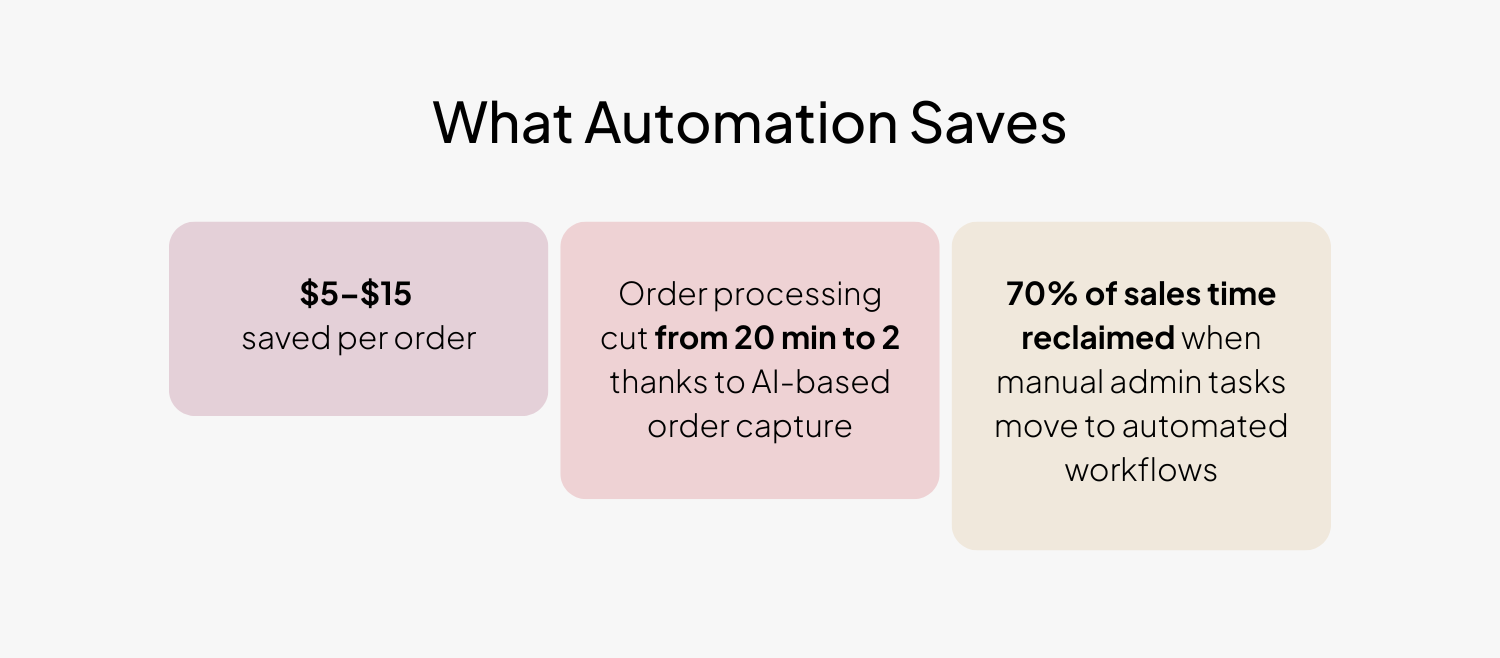 The difference shows up quickly once sales and order workflows are automated:
- Sales cycles that drop from weeks to days.
- Fewer pricing disputes and returns.
- More orders processed per rep without adding headcount.
For manufacturers and distributors that handle volume and complexity, those changes scale into real dollars and cleaner execution very fast.
Sales Workflow Automation Ideas and Examples
The sales process is usually where inefficiency shows up first. Buyers are ready to move, but the steps behind every quote and order still depend on people chasing updates. Most of those steps can already run automatically inside an eCommerce platform built for B2B.
Smarter RFQ handling
Requests for quotes often start well but vanish in a shared inbox. Automation changes that rhythm. Each RFQ submitted online becomes a tracked record with an assigned owner and a response timer.
Everyone can see what’s pending, what’s approved, and what needs input. For distributors that handle hundreds of quote requests a week, the difference is immediate: no lost requests or missed follow-ups, and a clear view of who’s responsible for what.
Approvals that move at the speed of business
Every quote or order touches several hands: sales, finance, management. When those approvals live in email, they slow the deal. A workflow engine routes each request automatically based on rules you define: large discounts go to a manager, high-value quotes trigger a finance check, and anything standard moves straight to the customer. Everyone works from the same version, and approvals finish in hours instead of days.
From quote to order without a second pass
In many sales teams, once a quote is accepted someone still has to key it into the ERP. That’s where errors creep in. When automation connects quoting and ordering, the accepted quote simply becomes an order, with pricing, terms, and product data already verified.
Reps stop double-handling data, finance gets cleaner entries, and buyers see their orders move faster through the system.
Buyer-side control
Corporate customers often have their own approval chains and spending limits. A B2B eCommerce platform can mirror that structure so buyers manage it themselves. Orders above a threshold automatically route to a designated approver within their company. Sellers don’t have to manage internal buyer politics; they just see approved orders come through, complete and compliant.
Contract pricing and credit validation
Negotiated pricing and credit terms are easy to promise but hard to police manually. Automation keeps those rules consistent. Customers see the correct contract prices as soon as they log in, and any order that exceeds a credit limit triggers an alert or hold for review. The system enforces the policies sales already agreed to, without manual oversight.
Offline orders captured automatically
Even with digital portals, many buyers still send purchase orders by email or upload PDFs. Instead of rekeying those, modern systems read them. Tools like AI SmartOrder parse the file, map SKUs, and create a draft order for review. Reps only check the flagged exceptions — everything else is ready to submit. For one of our clients, this automation cut order processing time from 20 minutes down to just two.
Gartner Insight: How leading B2B companies are shortening their sales cycle with eCommerce
Operations and Fulfillment Automation Ideas
Every improvement in sales speed eventually meets its test in operations. Orders confirmed faster only help if they move through fulfillment just as smoothly. This is where automation carries the handoff from sales to warehouse, connecting systems that used to operate in parallel.
Order processing without re-entry
When orders from different channels land in one workflow, the need for manual entry disappears. Each order flows straight to the ERP or warehouse management system with line items, shipping details, and payment terms intact. Teams no longer spend time transferring data between systems or correcting mismatched information later. The payoff is less rework and quicker acknowledgment back to the customer.
See B2B eCommerce Workflows in Action
Inventory and sourcing updates in real time
Stock visibility drives customer trust, but it’s easy to lose when data lives in separate systems. Automated inventory sync keeps counts current across warehouses and storefronts. As an order is placed, the system allocates stock and updates availability instantly. If the nearest warehouse is out of an item, a rule can redirect fulfillment to another location. The buyer sees accurate availability every time, and operations teams avoid last-minute adjustments.
Shipping coordination and status visibility
Once an order ships, the customer should never need to ask where it is. Integration with carrier systems lets shipment data update automatically. Tracking numbers, delivery status, and invoices post to the buyer’s account in real time. Customer service teams handle fewer “where is my order” calls and spend more time resolving exceptions instead of routine questions.
Returns handled like standard orders
Returns are often the least automated part of the order cycle. A returns workflow (RMA) gives them structure. Customers request a return online, select the reason, and the system decides if approval is needed. Once approved, it issues an RMA number, notifies the warehouse, and schedules a credit or replacement. The same workflow captures data on why items come back, helping operations fix upstream issues instead of guessing.
Document and compliance automation
For manufacturers shipping regulated or technical goods, automation ensures every order leaves with the right paperwork, such as safety data sheets, certifications, or spec sheets. Templates pull the correct files based on product attributes, so documentation travels with the shipment automatically. No one has to assemble PDFs by hand at the last minute.
Tune in: The Value of eCommerce for B2B Brands Beyond Sales
Finance and Compliance Automation Ideas
When the order leaves the warehouse, the process isn’t finished. The last step — pricing, invoicing, and payment — is where accuracy and policy matter most. Finance teams spend a surprising amount of time reconciling what was promised with what was sold. Automation keeps those rules consistent from the moment a quote is created to when payment is booked.
Pricing rules that enforce themselves
In B2B, pricing isn’t static. Customers have their own agreements, tiers, and rebates, and every exception carries risk. Automating those structures removes the manual checks. Once a price list or contract is linked to an account, it applies across quotes and orders automatically. Finance doesn’t need to validate each invoice, and customers always see the correct rate. The consistency protects both revenue and relationships.
Real-time credit and payment validation
Credit control is often where orders stall. Manual checks can hold transactions for days, especially when limits are close. Automated credit workflows review exposure instantly, place orders on hold when limits are exceeded, and notify both the customer and finance team for release. Payment status updates work the same way: if an invoice is cleared or a deposit confirmed, the order status updates across systems automatically.
Budget monitoring for buyer accounts
Many large customers run on internal budgets and purchasing caps. A platform can enforce those rules before an order even reaches finance. Each account or sub-account gets a spending limit and reporting view; when it’s reached, the next order requires approval on the buyer’s side. Sellers avoid after-the-fact disputes, and buyers stay within their own controls without relying on manual oversight.
Tax and regulatory checks
Compliance tasks, suck as tax exemption validation, export control, or documentation for hazardous materials, are easy to automate but still consume hours when handled manually. Linking those checks to customer and product data ensures they run in the background. If something’s missing, the system flags it before fulfillment. This creates consistency that audits can trace without pulling staff off daily work.
Transparent audit trails
Every automated action leaves a record. Quotes, discounts, approvals, and credit decisions carry timestamps and user history. That trail satisfies auditors and prevents internal confusion later. When disputes or reviews happen, finance teams don’t reconstruct what went wrong — they can see it.
Top Workflow Automation Features to Look for in a B2B eCommerce Platform
Most of the workflows described so far rely on the same foundation: a platform that can model how your business actually operates. If automation feels out of reach, it usually isn’t the process — it’s the system.
When evaluating eCommerce solutions, focus less on features lists and more on how the platform handles logic, data, and change.
| Capability | Why It Matters for B2B Sellers | What to Look For in a Platform |
| Built-in Workflow Automation | The backbone of every quote, order, and approval process. Without it, automation depends on plugins or custom code. | Look for a native workflow engine that allows users to configure rules, routing, and notifications through a visual or low-code editor. Sales ops should be able to adjust logic without developer help. |
| Native B2B Data Model | Most automation breaks when the system doesn’t understand accounts, hierarchies, or contracts. | Ensure the platform supports company accounts, multi-level hierarchies, budgets, buyer roles, and price lists by default. This structure keeps workflows clean and reusable. |
| Real-Time Policy Enforcement | Automation only works if business rules apply at the point of action, before mistakes enter the system. | Look for dynamic validation at checkout: pricing, credit, and approval rules that execute instantly. Finance shouldn’t rely on manual after-the-fact reviews. |
| Deep ERP, CRM, and WMS Integration | Workflows can’t function in isolation. Systems must exchange data automatically. | Verify the platform connects natively or via open APIs. A quote should become an ERP order and a CRM record without re-entry or file uploads. |
| Visibility and Audit Trails | Automation loses trust without transparency. | Ensure every step, from approval and discount, to credit release, is logged with timestamps and user data. Dashboards for SLA tracking and quote turnaround are equally important. |
| Security and Access Control | Automation extends system reach; permissions must keep up. | Choose a platform with role-based access, version tracking, and secure API management. Visibility should never mean loss of control. |
See how 11 B2B eCommerce Platforms Stack Up with the Comparison Table
From Automation to Acceleration
In most organizations, eCommerce workflow automation starts as a way to save time. Over time, it becomes how teams stay aligned. Once the process runs on defined rules, everyone sees the same data and follows the same steps—sales, operations, and finance working from one version of the truth.
For manufacturers and distributors, that alignment matters more than speed alone. It means quotes don’t go missing, orders flow straight into fulfillment, and customers know what to expect every time they buy. That reliability is what earns trust at scale.
Gartner’s latest research, How to Shrink Sales Cycles with Digital Commerce, shows how that same discipline across workflows translates into shorter, more predictable deal cycles.
Gartner Insight: How leading B2B companies are shortening their sales cycle with eCommerce
Frequently Asked Questions
What is B2B eCommerce workflow automation?
B2B eCommerce workflow automation refers to the use of automated processes and technology to streamline and optimize the various steps involved in the B2B eCommerce process, such as order processing, inventory management, shipping and delivery, payment processing, and customer service, with the aim of improving efficiency, reducing errors, and enhancing the overall customer experience.
How does B2B eCommerce workflow automation improve order management?
B2B eCommerce workflow automation improves order management by streamlining order processing, inventory management, order tracking, and shipping and delivery. It can also provide real-time visibility into order status and inventory levels, enabling businesses to make more informed decisions and optimize their operations.
How does B2B eCommerce workflow automation streamline the quoting and pricing process?
B2B eCommerce workflow automation can streamline the quoting and pricing process in the following way:
1. Automated Quoting: When a customer submits a request for a quote, the B2B eCommerce system can automatically generate a quote based on predefined pricing rules and customer-specific pricing agreements. This can be done in real-time, with the customer receiving an instant quote.
2. Approval Workflows: If the quote requires approval from a manager or other team member, the B2B eCommerce system can automate the approval process. This can involve sending automated notifications to the relevant team members, with the option to approve or reject the quote online.
3. Pricing Rules: The B2B eCommerce system can be configured to apply different pricing rules based on various factors, such as the customer’s order history, the volume of the order, or the products being ordered. This can help to ensure that customers receive accurate and competitive pricing.
Are there any specific challenges to consider when implementing B2B eCommerce workflow automation?
Yes, there are specific challenges to consider when implementing B2B eCommerce workflow automation. These may include the need to integrate with existing systems and processes, ensuring data accuracy and consistency across different systems, managing complex pricing and discount structures, and ensuring that the system can handle the unique requirements of B2B transactions, such as purchase orders and invoicing.
Additionally, there may be resistance from employees who are accustomed to manual processes, and there may be a need for training and change management to ensure successful adoption of the new system.