navigation

At OroCommerce, we build for the businesses behind the scenes: the manufacturers, distributors, and wholesalers that keep supply chains moving. These are companies with complex catalogs, layered buyer relationships, and workflows that don’t fit into off-the-shelf tools.
The 6.1.4 feature expansion continues our focus on giving those teams more native power inside one platform. Instead of juggling add-ons or costly integrations, sales, operations, and finance can now manage the full cycle from quote to cash with greater clarity and control.
This update also brings new strength to global and partner-driven selling. Flexible multi-currency pricing, third-party quoting options, and external order imports help teams scale without adding complexity. And on the customer side, improved inventory displays and dashboard scorecards give buyers the answers they need the moment they need them.
We’re releasing these upgrades ahead of the next LTS (long-term support) release because many are worth acting on now. If they solve a problem you recognize, now’s the time to act.
See how these updates work in practice – watch the demo
A Smarter Invoicing Experience for Everyone
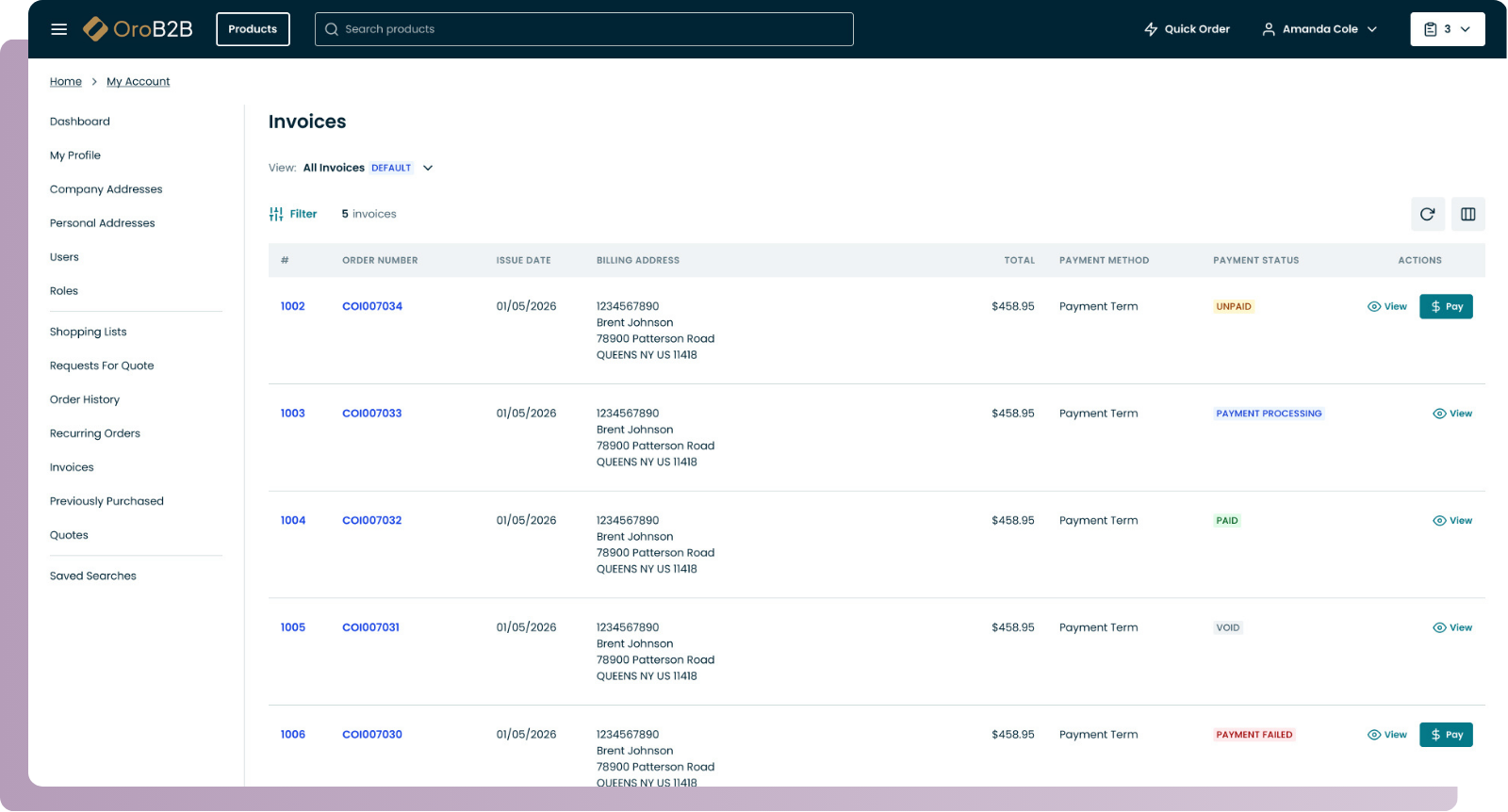
OroCommerce now offers a seamless invoicing workflow that helps both buyers and sellers save time and reduce friction, all without switching between systems. From issuing and managing invoices to paying them online, everything happens right inside OroCommerce.
What’s new:
- Customer Invoicing Portal: Buyers can view and pay invoices directly online using Stripe Elements or OroPay.
- Back-Office Invoice Management: Sales and finance teams can view, track, and manage invoices right in the Oro back office.
- Automated Invoice Delivery: Invoices can be sent as PDF attachments in emails or made available for download in the portal.
- Flexible Global Configuration: Invoicing settings can be adjusted globally to meet your business needs.
- Invoice API Support: Easily integrate invoice data with external systems or ERP platforms.
OroPay: Built-In Payments for B2B Commerce
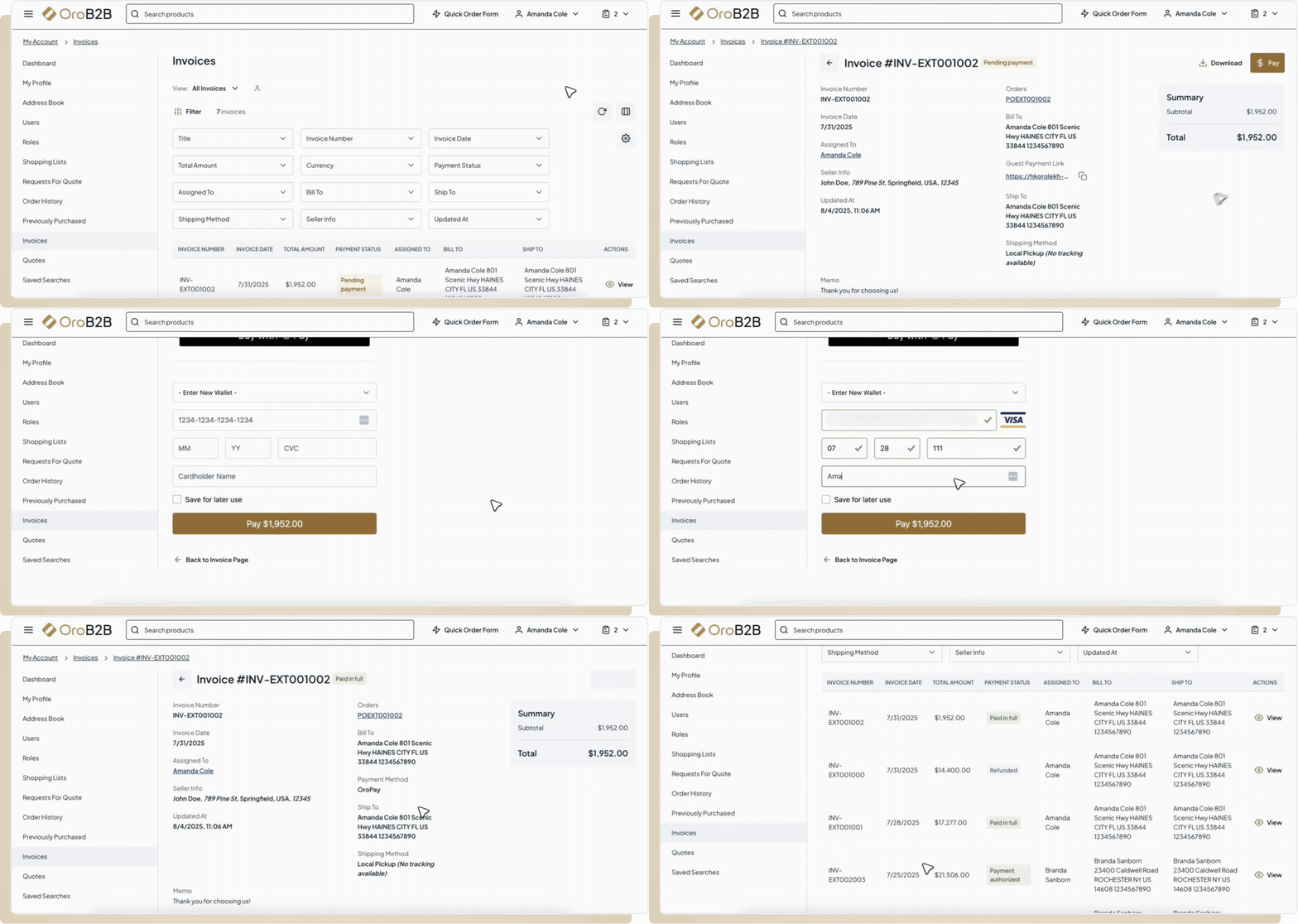
OroPay is OroCommerce’s native payment solution, developed in partnership with Global Payments, a leader in secure payment technology. It’s designed for invoice-heavy and multi-brand B2B businesses that want to simplify how customers pay, reduce manual reconciliation work for their AR teams, and keep everything, from checkout to reconciliation, within one system.
What’s new:
- Native to OroCommerce: No need for third-party plugins or payment gateways.
- Supports Credit Card and ACH Payments: Available during checkout and from the Invoices section in the customer portal.
- Enterprise-Grade Security: Real-time fraud protection, tokenization, and full compliance with PCI DSS, SOC 1 & 2, SCA, and 3D Secure 2.0.
- Streamlined Reconciliation: Payments are automatically linked to the right invoices and orders.
- Available Exclusively to Oro Customers: Tailored for the needs of B2B workflows and multi-brand setups.
Real-Time Inventory Visibility on the Storefront
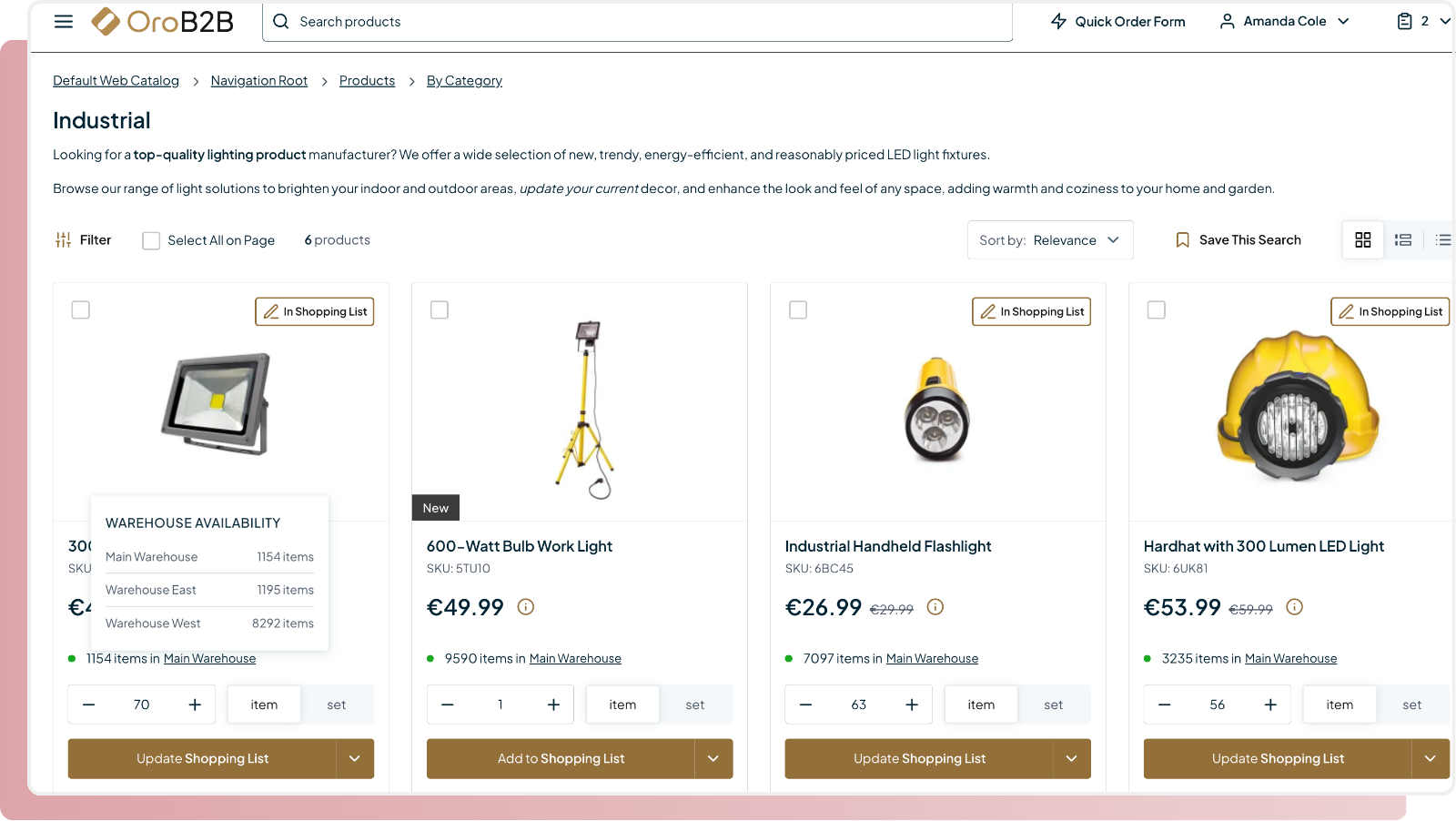
OroCommerce now gives buyers clear, real-time insight into product availability right from the storefront, helping them make informed purchasing decisions without delays or guesswork. For sellers, this means fewer phone calls and availability requests, plus the ability to fine-tune visibility for every customer or group. Whether you want to show totals, per-warehouse stock, or restrict visibility by customer, Oro gives you ultimate flexibility without custom work.
What’s new:
- Inventory Display Across Storefront Sections: Show inventory levels on product listings, search results, product detail pages, shopping lists, the quick order page, and during checkout.
- Flexible Warehouse Views: Display inventory as a total or broken down by warehouse, including first available, all with stock, or all regardless of stock.
- Per-Customer Warehouse Settings: Assign specific warehouses to customers or customer groups to control what inventory data they see.
- Fully Configurable: Enable or disable inventory visibility at global, organization, website, customer group, or customer levels.
- Quick Order Page Enhancements: Inventory levels are shown alongside each entered item, helping buyers see stock status instantly as they build large or repeat orders.
- Inventory-Based Product Sorting: Automatically prioritize in-stock products on category pages, search results, and product collections. You can choose where this applies and control it at the global, organization, or website level.
Better Quote Management for External Sales and B2B2X Models
These enhancements are especially valuable for companies working with external sales reps, resellers, or contractors who need to generate quotes using live product and pricing data. Whether you’re enabling channel partners to quote independently or supporting a broader B2B2X strategy, OroCommerce now makes it easier to expose quoting capabilities securely and integrate them into external workflows, while maintaining centralized control.
What’s new:
- Quote API: External systems can now create and manage quotes through a back-office API — ideal for connecting field sales tools, CRMs, or partner portals.
- Project Name Field: A new “Project Name” field can be added to both RFQs and Quotes, making it easier to track and search by project or initiative. When a quote is created from an RFQ, the project name transfers automatically.
- Customer-Facing Attachments: Admins can now attach downloadable files to quotes and orders, such as spec sheets, contracts, or terms, which customers can access directly from the storefront.
- API Support for Attachments: Quote and Order attachments are also supported via API, allowing external systems to upload and sync files as part of integrated workflows.
Customer Dashboard Scorecards
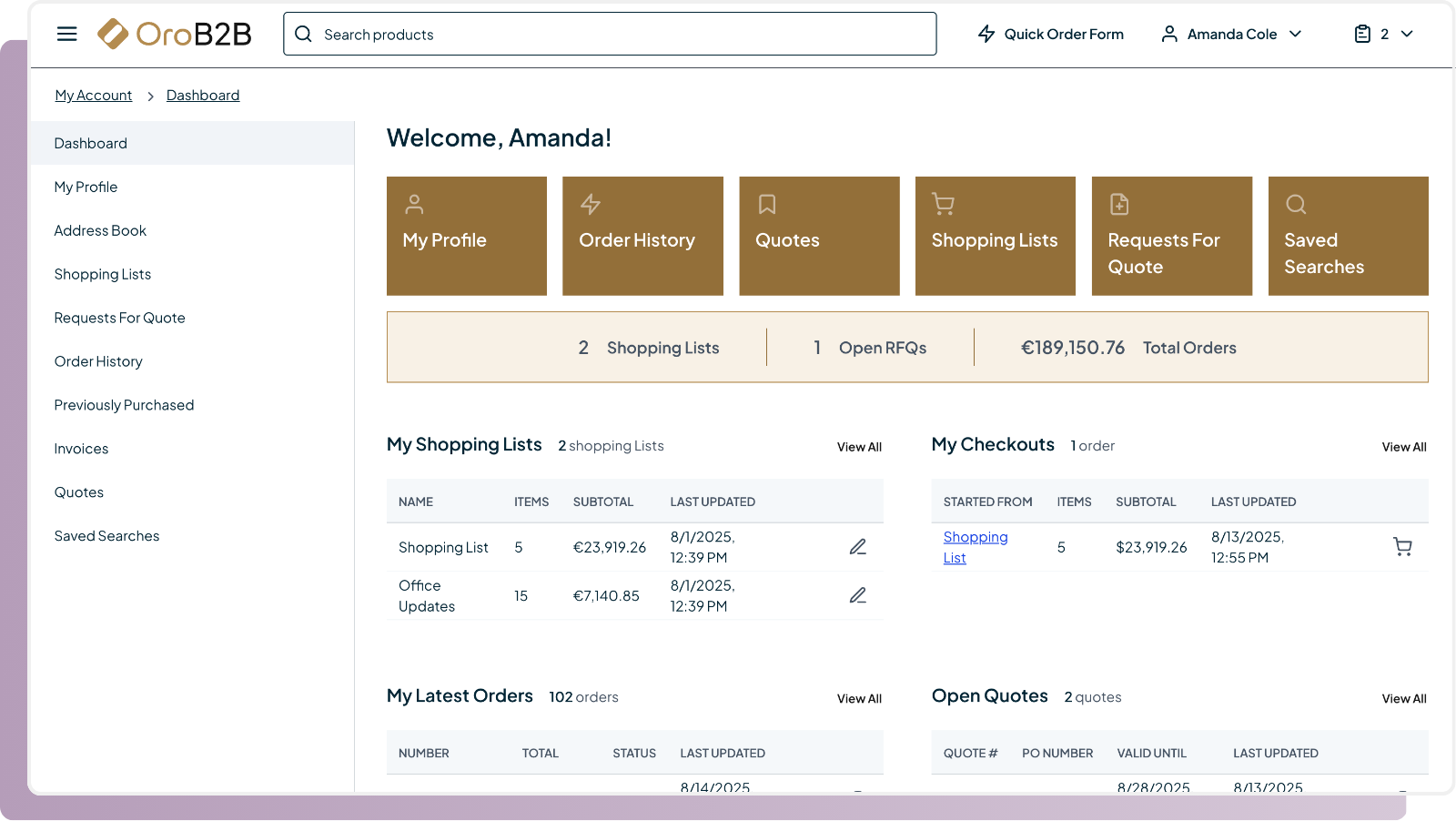
To help buyers stay on top of their account activity, OroCommerce now includes a scorecard widget on the Customer Dashboard. These real-time metrics give buyers a quick snapshot of key data — such as orders, quotes, and user accounts — with one-click access to the relevant sections. Each scorecard respects buyer permissions, supports localization, and can be configured just like any other dashboard widget.
What’s new:
- Users Scorecard: Displays the number of buyer-side users under the account (including sub-accounts, based on access level) — links to the Users page.
- Shopping Lists Scorecard: Indicates the number of shopping lists to which the buyer has access, links to the Shopping Lists page.
- Open RFQs Scorecard: Displays the number of open (non-cancelled) RFQs the buyer can view. Links to the Requests for Quote page.
- Total Orders Scorecard: Displays the total value of all non-cancelled orders the buyer can access, supporting multi-currency and pricing rounding. Links to the Order History page.
Smarter Multi-Currency Pricing
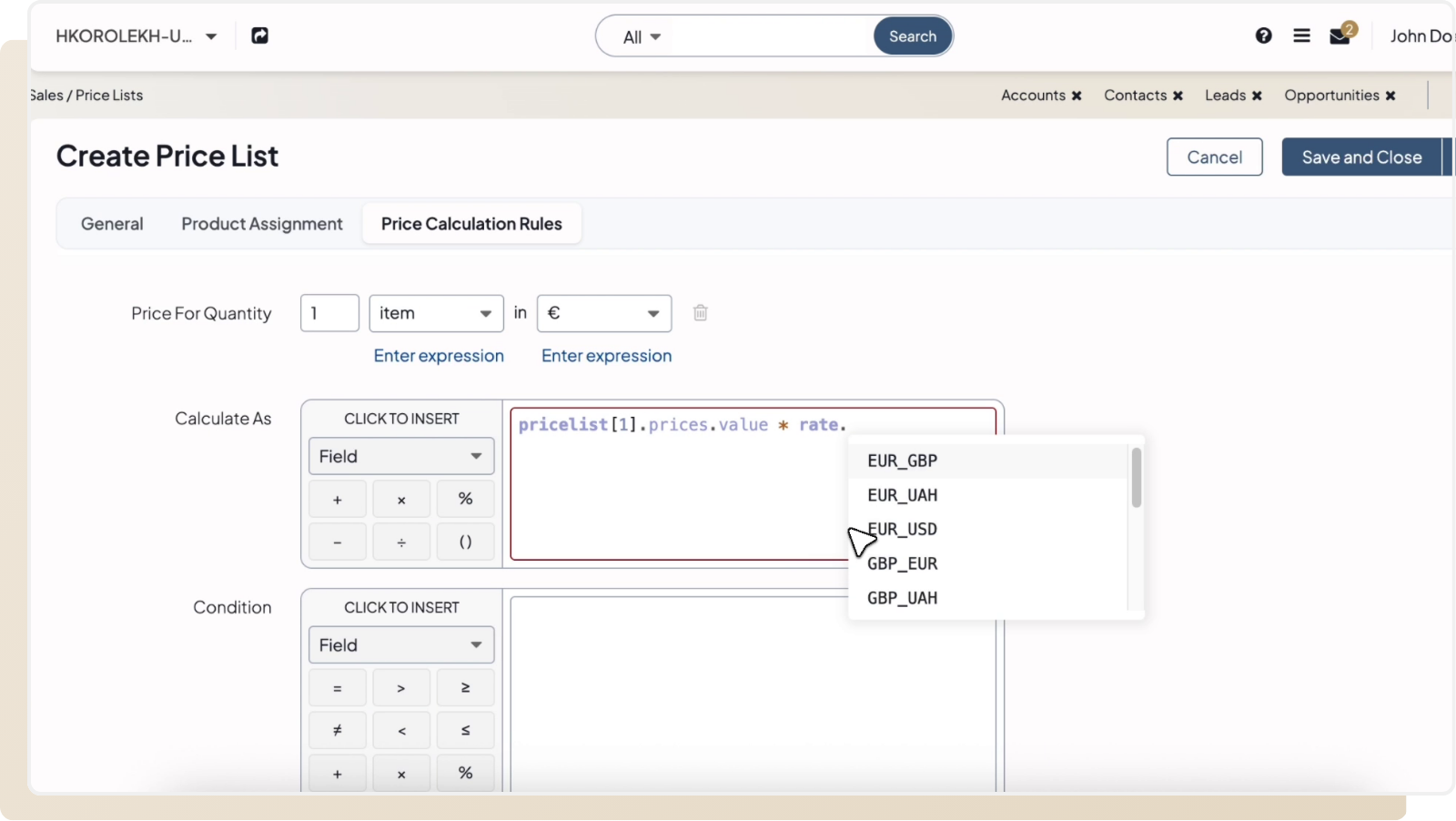
Merchants selling in multiple currencies can now simplify pricing management by referencing currency conversion rates directly in price calculation rules. This eliminates the need to manually update prices across currencies — just update the exchange rate in the system config, and affected price lists will recalculate automatically.
What’s new:
- Currency Rates in Price Rules: Use system-defined exchange rates in price list formulas.
- Auto Recalculation: Updating a conversion rate at the global or organization level triggers recalculation of all affected price lists.
- No Manual Repricing Needed: Avoid redundant price maintenance when exchange rates shift.
External Order Import
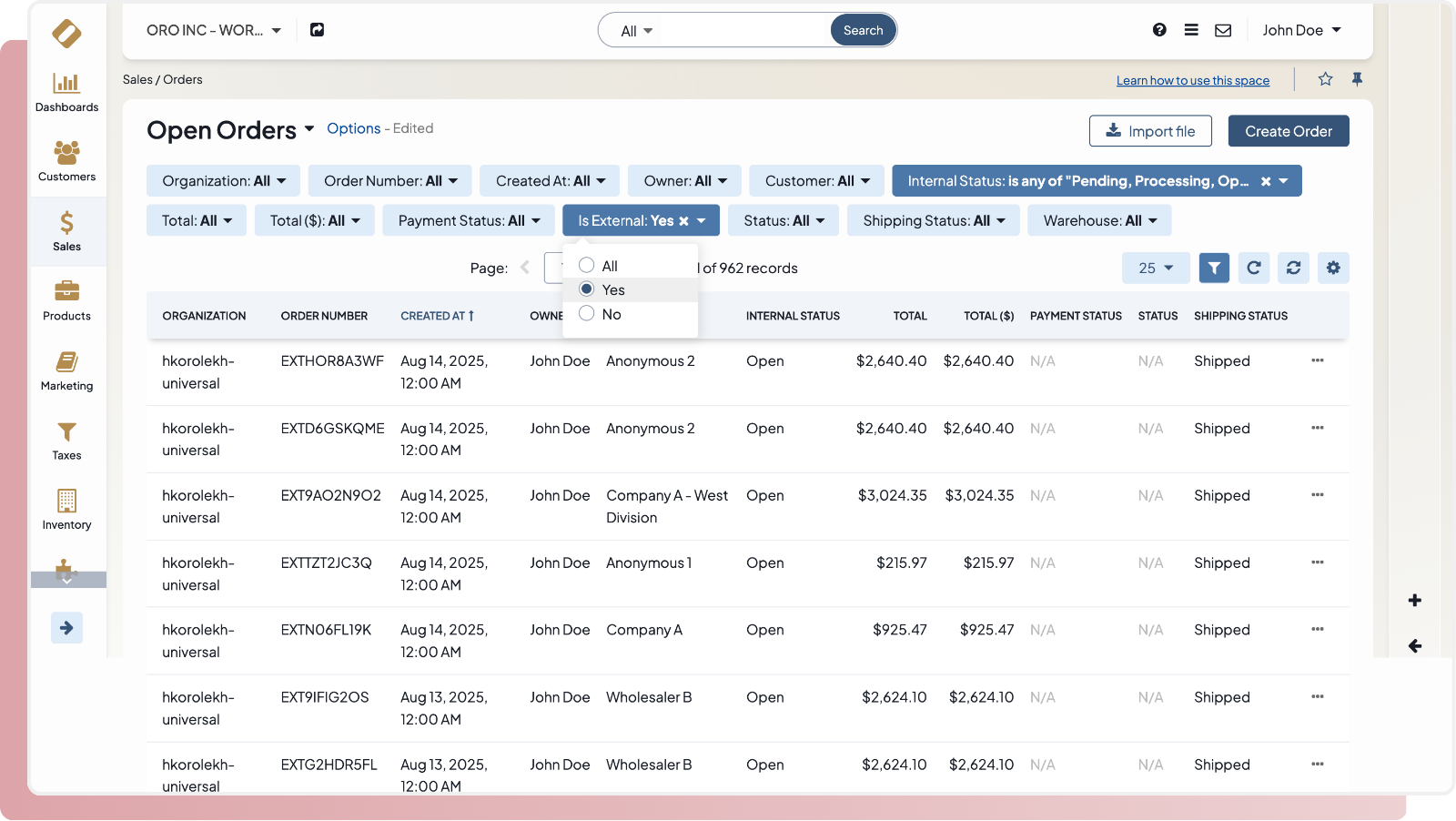
OroCommerce now supports importing historical and ERP-originated orders, giving buyers a unified view of their complete order history, without disrupting active order workflows. This feature is ideal for companies transitioning to OroCommerce or running hybrid processes, ensuring full transparency while preserving data integrity.
What’s new:
- ERP Order Import via JSON: Admins can import legacy orders from ERP systems in JSON format using a built-in tool. A downloadable template and validation steps are included.
- Read-Only Legacy Orders: Imported orders are marked as external and cannot be edited in OroCommerce. Tax, discounts, and payment history are also locked.
- Product Matching by SKU: Line items are automatically linked to products when SKUs match; unmatched items are still shown but excluded from features like best-sellers or previously purchased reports.
- “Imported from ERP” Note: Orders include a clear note to indicate their origin.
Security & Performance
Two behind-the-scenes upgrades make OroCommerce faster for buyers and more secure for organizations. Asset preloading helps improve page load times and boost SEO performance, driving more traffic and increasing the visibility of your products in search. On the security side, tighter SSO controls let you prevent unauthorized access by ensuring only users with approved company email domains can log in.
What’s new:
- Asset Preloading for Faster Page Loads: Frontend developers can now preload critical assets (like fonts, images, and styles), improving storefront rendering speed and SEO metrics out of the box.
- SSO-Only Logins for Trusted Domains: Admins can now enforce single sign-on (SSO) authentication for users from selected domains, blocking access via email/password and ensuring secure login through Microsoft 365 or Google SSO only.
Reminder: Extended Support for 6.1 LTS and Beyond
As we shared in our 6.1 LTS announcement, OroCommerce is now offering longer and more flexible support cycles, giving our customers more value from every deployment and reducing the total cost of ownership over time.
- 4 Years of Standard Support: Starting with version 5.1, all LTS releases now receive 4 years of standard support, with the option to extend up to 6 years — a level of support unmatched in B2B eCommerce.
- New Back-Porting Policy: Beginning in 2025, select new features will be published to the two most recent LTS versions. That means customers on 6.0 and 6.1 can benefit from features introduced in 7.0, without having to upgrade right away.
This change gives you more stability and more time to plan upgrades on your terms.
Don’t Wait, Start Unlocking These Features Today
Every feature we release is designed to solve real challenges across complex product catalogs, layered buyer relationships, and multi-site operations, so you can run leaner, smarter, and more scalable sales processes.
Already using OroCommerce? Now’s the perfect time to review these updates with your team or integration partner and start planning your upgrade.
New to Oro? We’d love to hear about your business model and challenges, and show you how OroCommerce can support your goals. Let’s talk.