navigation

Digital has become the default starting point for a lot of B2B buying. McKinsey found that 57% of buyers now rank it as their primary purchasing channel, up from 33% in 2022.
That doesn’t make the sales relationship obsolete. A buyer can handle routine work independently, then bring in a rep when the purchase involves advice, negotiation, or an exception.
For distributors, that changes the job of self-service. It has to support buyer independence and the moments when sales joins the process, while still giving the business the operational efficiency it expects from digital.
This article looks at how that hybrid model works and what self-service portals for B2B buyers need underneath it.
What is a B2B Self-Service Portal?
A B2B self-service portal is a secure digital space where customers can access their account, find information, and complete tasks with a supplier. Unlike a public eCommerce site, the experience reflects the customer’s relationship with the business, including customer specific catalogs, pricing, orders, permissions, and purchasing processes.
Business buyers may be used to handling routine tasks digitally in their personal lives, but buying for a company comes with account structures, purchasing rules, and supplier relationships that the portal also has to accommodate.
What customers do inside that portal can vary. Some tasks are easy to complete independently. Others call for input from sales or service, particularly when a purchase involves negotiation, configuration, or an exception.
A B2B self-service portal therefore has to support three ways of buying: customers working independently, sellers stepping in to help, and both sides sharing the same process.
Let’s look at how each one plays out.
When the Buyer Manages the Purchase
The buyer completes the task independently through a digital channel. This works well for things they already know how to do, such as checking an order, reviewing account-specific pricing data, or reordering a familiar product.
Braskem, for example, gives customers direct access to order placement, shipment tracking, and account management through its Bridge platform. Today, more than 800 companies use the platform, which processes 12,000 orders each month. You can read their story here.
When the Buyer Needs Help
Seller-assisted buying gives the customer a digital way to do much of the work themselves, then bring in a salesperson or service team when the process needs their input. The handoff can happen after the buyer has already researched products, made selections, or provided the details needed to move forward.
Ciranda built its portal with that relationship in mind, enabling customers to place orders, request samples or quotes, pay invoices, and access documents online while their dedicated sales rep remains visible in the portal. Sales and customer service teams can also log in as the customer to help with registration, first orders, or issues along the way.
The portal gives the seller a digital way to support the account while customers gradually take on more tasks themselves.
When Buyer and Seller Share the Process
In a hybrid model, the buyer and seller can both work on the same purchase as it progresses. A buyer might start a request online, a salesperson step in to advise or make changes, and the buyer return to the digital process to continue or complete it.
HKL BAUMASCHINEN uses this model for equipment rentals. Customers can choose equipment online, specify the rental period and required accessories, select pickup or delivery, and submit a quote request themselves. From there, a customer advisor takes over with those details already captured. This matters for equipment rental, where each request can vary by machine, job requirements, and configuration.
For HKL, the digital process gives customers more control over starting a rental while giving advisors a better starting point when they step in.
Read our guide on how B2B portals can support self-service and sales in the same buying experience
Self-Service Doesn’t Always Happen on Your Website
A customer portal may be the most visible part of B2B self-service, but it’s only one of the self-service options available to business customers. Buyers already have purchasing systems and habits they use every day, so self-service shouldn’t depend on one user friendly interface or one place to log in.
Depending on the task, that could mean:
- Buyers place or manage orders through a customer portal, where they can also access invoices, check order history, or track shipments.
- Procurement teams purchase from their own system through PunchOut, while still accessing the supplier’s customer specific pricing or contract pricing.
- Customers send purchase orders by email and AI converts them into digital orders.
- Buyers use an AI assistant for instant access to product, pricing, or account information.
The route may change, but the context shouldn’t. Unified data should keep the same account, pricing, and order information available when the buyer moves between channels or brings in sales.
How AI Is Creating New Ways to Self-Serve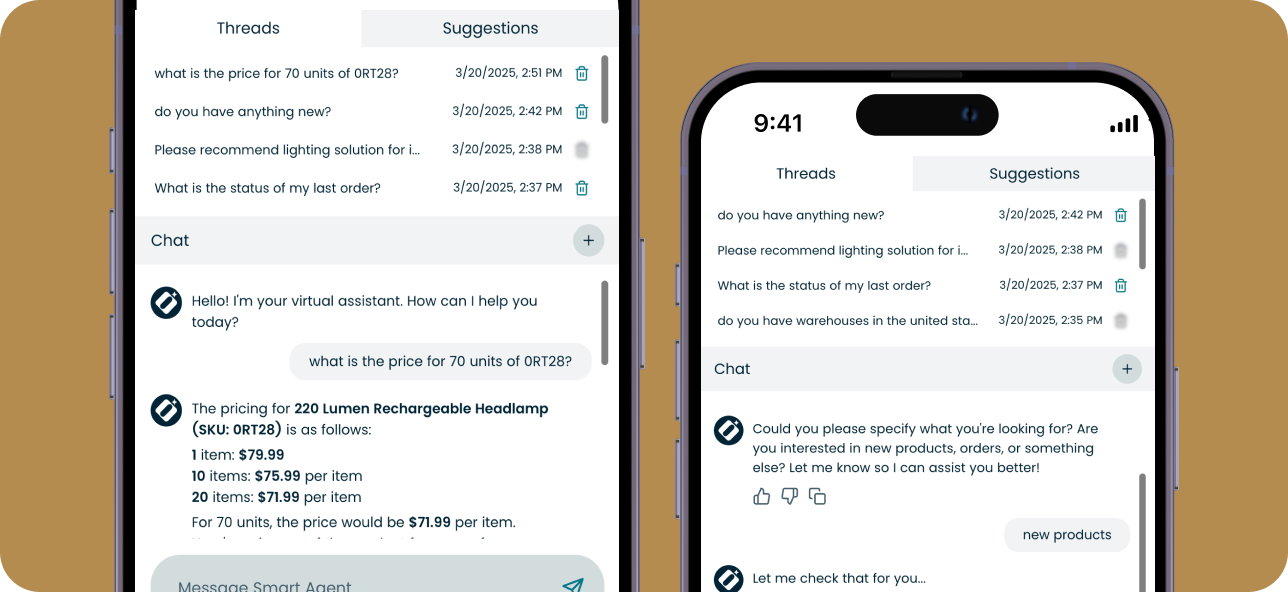
AI can take self-service beyond the basic functionality of a portal, letting buyers start from a PO or a conversation instead of navigating another interface.
AI-powered sales order automation is one example. A buyer can create a purchase order in their own ERP system, email it as they normally would, and let AI turn that document into a draft digital order. They still initiate the purchase and review the order before it moves forward.
ICL uses this model for enterprise customers who prefer to keep ordering by PDF purchase order. It gives those buyers a self-service path that fits the process they already use instead of asking them to rebuild the same order in a portal. For ICL, fewer manual entry steps improve internal efficiency and streamline operations as order volume grows.
Conversational AI gives buyers another route. They can ask an AI assistant to find a product, check availability or pricing, or answer routine inquiries using the supplier’s commerce and account data.
These tools let buyers start from the process that already works for them, whether that’s a PO, a procurement system, or a conversation. Sales can still step in when the purchase needs human input, with the context already there.
The Must Have Features for Hybrid B2B Self-Service
More ways to self-serve put more responsibility on what happens at the technology level. Buyers need to be recognized correctly, see information they can trust, and take action under the rules of their account.
The following four areas show whether the technical foundation can support that.
1. Does Every Interaction Know Who the Buyer Is?
A B2B account is rarely one person with one set of permissions. Customer segments, purchasing roles, locations, and account rules can all change what a buyer is allowed to see and do.
Check whether your setup can:
- Apply customer specific pricing and contract terms by account.
- Enforce user permissions, approval rules, and cost centers.
- Support user management across buyers, managers, and approvers.
- Keep account details tied to the right organization and location.
- Protect customer data by limiting access according to role and responsibility.
The same rules should follow the customer whether they’re working independently or a salesperson is helping them.
2. Can Buyers and Sales Trust the Same Information?
Self-service breaks down quickly when a buyer has to call a rep to confirm what the portal says. Pricing, inventory, order history, and financial data often come from several core business systems, so the customer and seller need to be working from the same information.
Check whether buyers have:
- Current pricing and product availability.
- Order history and delivery tracking.
- Easy access to invoices, balances, and other financial data.
- Consistent account information across commerce, ERP, and CRM systems.
For inventory and order status, some businesses will also need real time data rather than periodic updates.
3. Can Buyers Get the Job Done on Their Own?
If self service tools stop at showing information, customers still need a person to move routine work forward.
Depending on the business, buyers may need to:
- Independently manage orders, reorder products, or change quantities.
- Access invoices and payment information.
- Submit RFQs or quote requests.
- Submit support tickets and follow their status.
- Manage shipping information or delivery details.
- Handle routine administrative tasks tied to their account.
Removing unnecessary back-and-forth can shorten response times and, in quote-heavy processes, contribute to faster sales cycles. It can also reduce the routine work that adds to operational costs.
4. Can Sales Step In Without Starting Over?
This is where hybrid buying puts more demands on the platform. When a buyer reaches the point where they need help, the salesperson should inherit the work already done rather than reconstructing the purchase from emails and phone calls.
Check whether sales can:
- See the quote, RFQ, cart, or order the buyer has already started.
- Work from the same customer data and account rules.
- Add information, make changes, or create an order on the customer’s behalf.
- Let sales see buyer questions and conversations in the context of the relevant order, quote, or RFQ.
- Hand the process back so the customer can continue digitally.
User feedback can be especially useful here. If customers repeatedly leave self-service at the same point or sales keeps rebuilding the same information, that usually shows where the handoff still needs work.
Those handoffs have a direct effect on customer satisfaction because they shape how much effort a customer has to repeat when moving between digital and human support.
ERP-Attached Self-Service Portal vs. B2B eCommerce Platform
The self-service platform’s requirements above can sit close to the ERP or be handled by a dedicated B2B commerce platform. The better fit depends on how much of the buying relationship you want the digital layer to support.
| Criteria | ERP-attached portal | Dedicated commerce platform |
| Best fit | Customers mainly need access to orders, invoices, account information, purchase history, and straightforward reordering. | Customers need to research, quote, order, manage their account, and move between self-service and sales support. |
| Pricing and catalogs | Usually follows the structures already maintained in the ERP. | Can support customer specific pricing, contract pricing, account-specific catalogs, and personalized experiences. |
| Buying workflows | Works well for simpler transactions and common account tasks. | Better suited to RFQs, approvals, recurring orders, complex checkout rules, and other B2B workflows. |
| Customer accounts | Often mirrors the account structure available in the ERP. | Can support corporate accounts with multiple users, roles, locations, permissions, and approval paths. |
| Sales involvement | Sales teams may continue working mainly through CRM, email, or the ERP when customers need direct assistance. | Sales teams and buyers can work in the digital portal around the same quotes, orders, accounts, and customer activity. |
| Customer experience | Often focuses on access to existing ERP information and basic digital convenience. | Can support richer experiences such as personalized dashboards, product discovery, account management, and guided buying. |
| Role of the ERP | The ERP remains the main source and often defines how far the portal can extend. | The ERP remains a core system, while commerce manages the customer-facing buyer journey and connects it with CRM, PIM, procurement, payment, and other critical tools. |
If the goal is mainly account access and straightforward transactions, an ERP-attached portal may be enough and can keep ongoing maintenance relatively contained.
If buyers and sales need to share more of the purchase, a B2B commerce platform gives you broader self service capabilities and more room to adapt as customer needs change. Over time, that can support customer retention and business growth by making the digital experience easier to keep aligned with how customers prefer to buy.
See how the best eCommerce platforms for B2B self-service compare, and which capabilities to look for as you evaluate your options.
Where Self-Service and Sales Meet in OroCommerce
OroCommerce was built around B2B account relationships, so buyers and sales teams can work from the same customer context instead of operating in separate digital tracks.
A few capabilities support that model:
- Commerce and CRM share the same customer context. Sales teams can work with the same accounts, quotes, orders, and customer activity that buyers use online. That matters for seller-assisted and hybrid buying, where the interaction may move between the portal and a sales representative.
- Self-service can follow each account’s buying rules. OroCommerce can apply the right approvals, permissions, quote steps, and recurring-order rules automatically, so buyers can complete more of the process themselves while staying within the terms set for their business account.
- Hybrid selling is built into the workflow. Sales reps can log in as a customer, work from buyer shopping lists, create quotes or orders on their behalf, and continue conversations tied to an order, quote, or RFQ.
- AI extends self-service. AI SmartAgent lets buyers use natural language to check products and take actions such as creating orders. AI SmartOrder brings emailed or PDF purchase orders into the digital workflow, while OroIQ gives internal teams a conversational way to query data and execute tasks.
- The architecture can adapt to the business. Open APIs, customizable workflows, and ERP integrations let companies connect the portal to the systems and processes they already run. That helps keep service delivery consistent as buyers move between digital and human support.
- One platform can support different customer experiences. Multi-organization, multi-site, and multi-portal capabilities make it possible to serve different businesses, regions, and customer groups from the same underlying platform.
This gives manufacturers and distributors a way to support self-service, seller-assisted, and hybrid buying through the same commerce layer.
See what hybrid B2B buying looks like in practice. Book OroCommerce demo
Build Self-Service Around the Way B2B Buyers Do Business
B2B buyers want more control over routine tasks, but many purchases still benefit from human input. The strongest self-service models give buyers room to move independently while keeping sales and service connected to the same process.
That means building for the way customers already buy: through portals, procurement systems, AI, and direct conversations with your team.
Discover how B2B portals can support self-service and sales in the same buying experience