
navigation

Managing role-based permissions in B2B eCommerce gets tricky when customers have multiple buyers, locations, and purchasing rules. How do you give everyone the access they need while keeping sensitive information protected?
In this guide, we’ll cover:
- How role-based access control works in B2B eCommerce.
- How to build a permissions matrix for different users and responsibilities.
- How to manage permissions securely, including access for AI agents.
- How OroCommerce handles granular access controls for manufacturers and distributors.
What Is Role-Based Access Control in B2B eCommerce?
Role-based access control (RBAC) is a way to manage what users can see and do in an eCommerce platform based on their assigned roles. Instead of setting access permissions for every person individually, businesses define roles, such as buyer or purchasing manager, and assign the appropriate permissions to each.
How RBAC Works Across Different Roles and Locations
Say your customer operates 15 branches. A buyer in Chicago needs to see their branch’s orders. A regional manager needs visibility across five branches, while the head of purchasing needs access to all 15.
They may all have permission to view orders, but their access rights cover different parts of the business.
This is where access scope comes in. It defines which records a user can access based on their job responsibilities and place in the company’s organizational structure.
For larger B2B customers, user access management needs to reflect these differences. You can assign specific permissions to each role, then define which branches or accounts those permissions apply to.
What Are the Different Access Control Models?
RBAC is one of several access control models. Depending on how a system is designed, different approaches can also work together.
- Attribute-based access control (ABAC) considers factors such as department, location, or customer account when granting access.
- Access control lists (ACLs) define which users can access specific resources.
- Mandatory access control (MAC) follows centrally enforced security policies.
- Discretionary access control (DAC) allows resource owners to decide who gets access.
There are also variations of RBAC itself. Hierarchical RBAC allows higher-level roles to inherit permissions, while constrained RBAC can prevent conflicting responsibilities, such as allowing someone to both submit and approve the same purchase.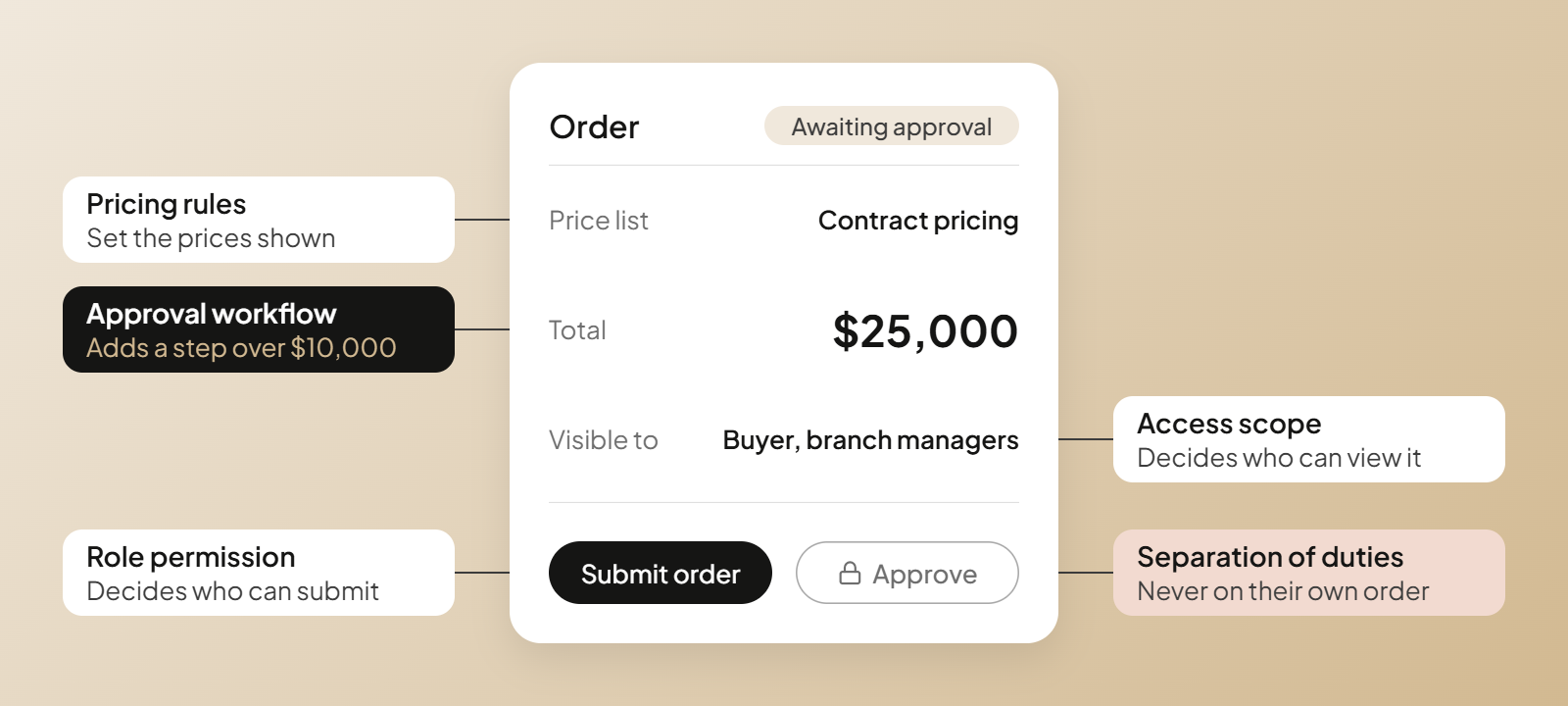
Say a buyer has permission to place orders through your customer portal. They add $25,000 worth of products to their cart and hit submit.
But their company requires manager approval for purchases over $10,000. So what happens next?
That’s where approval workflows come in. In an RBAC model, user permissions determine who can perform certain actions, while workflows establish the conditions under which those actions require additional steps.
Here’s how these access control mechanisms work together:
| Business question | What’s responsible? |
|---|---|
| Can the buyer create and submit an order? | Permissions assigned to their role |
| Does an order over $10,000 require approval? | Approval workflow |
| Who is authorized to approve that order? | Role permissions and workflow rules |
| Which prices does the buyer see? | Pricing configuration |
| Can the buyer view another employee’s orders? | Permissions and access scope |
These controls need to work together, but they’re not interchangeable. Giving someone permission to submit orders shouldn’t automatically let them bypass purchasing approvals. Similarly, changing someone’s role assignment shouldn’t unexpectedly change their negotiated prices.
This becomes especially important when employees hold multiple roles. Someone might have access privileges to both create and approve orders, but that doesn’t necessarily mean they should be allowed to approve their own purchases.
When planning an RBAC implementation, consider whether your platform allows customer administrators to add employees, assign predefined roles, and remove system access when someone leaves. For companies managing hundreds of B2B accounts, customer-managed access can be a scalable solution to the constant stream of routine requests.
See what else your platform needs for complex B2B accounts.
Implementing RBAC Framework With a B2B Permissions Matrix
Before you start configuring roles in your eCommerce platform, it’s worth getting everyone on the same page about who needs access to what.
A permissions matrix helps you do that. It’s a simple spreadsheet that documents the access different users need, so your team can review the requirements before anyone starts changing system settings.
Here’s how to build one.
Step 1: Identify What Needs Access Controls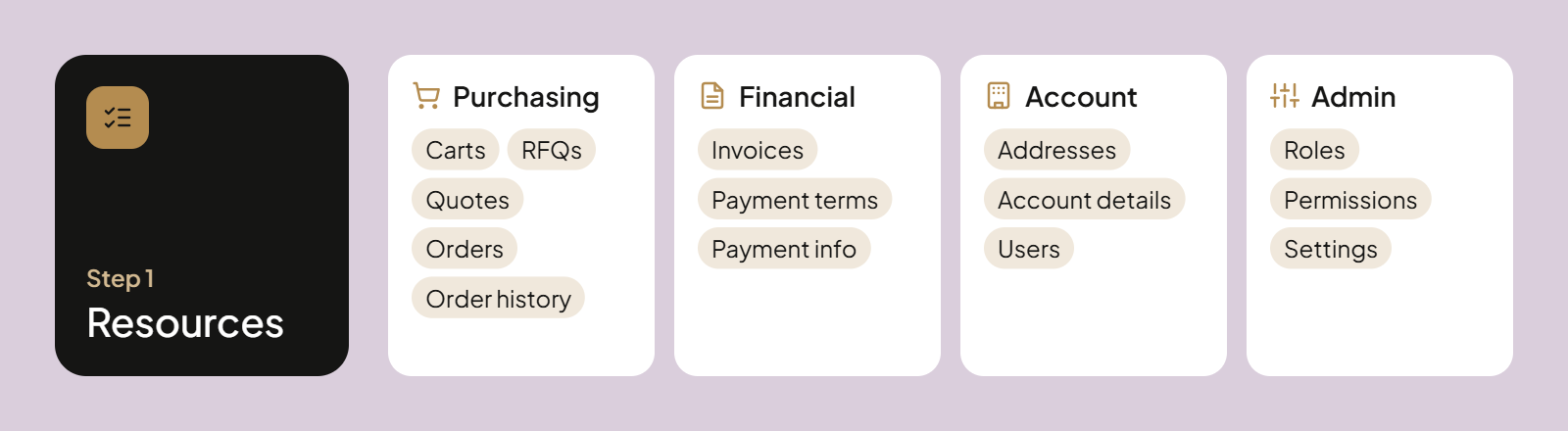
Imagine a customer asks you to give their new finance employee access to invoices, but not quotes or company account settings. Can your platform accommodate that request?
Start by listing the parts of your customer portal that may need separate permissions. Think beyond orders and include:
- Purchasing: Shopping carts, RFQs, quotes, orders, and order history.
- Financial information: Invoices, payment terms, and payment-related information.
- Account management: Company addresses, account details, and customer users.
- Administration: User roles, access permissions, and company settings.
Don’t worry about assigning permissions to individual roles yet. The goal is to identify everything that needs an access decision.
One thing to watch: not everything is controlled through RBAC. For example, customer-specific pricing or catalog visibility may depend on separate platform configurations. Keep those requirements on your list, but check how your platform handles them.
Step 2: Decide What Users Can Do With Each Resource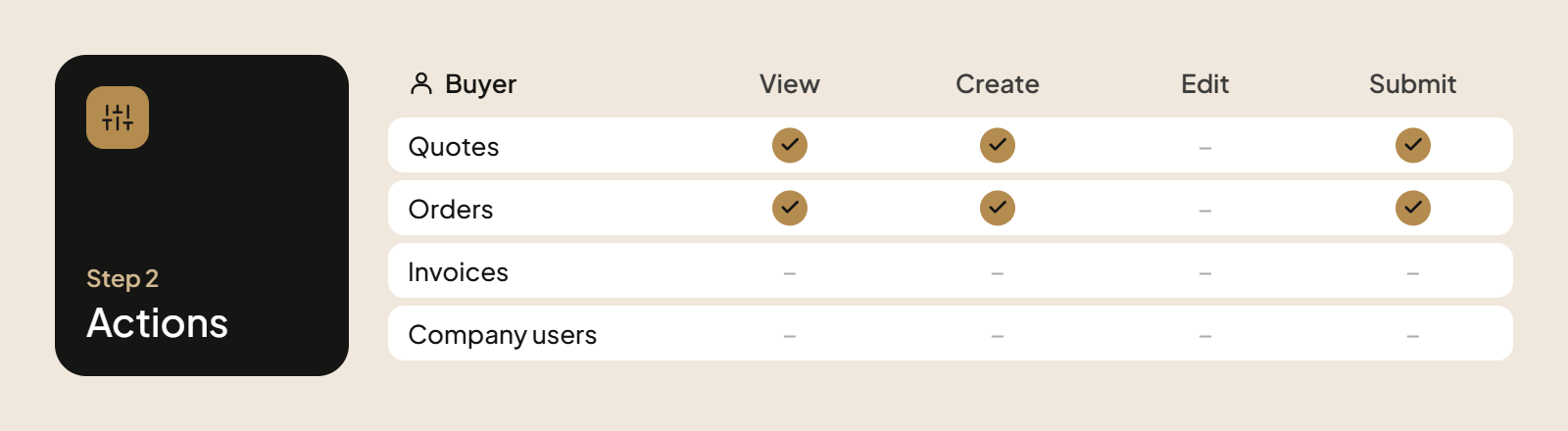
Access isn’t always an all-or-nothing decision. Someone might need to view an invoice but have no reason to edit payment terms or change billing information.
For each item on your list, consider which actions need separate permissions:
- View: Can users see the information?
- Create: Can they add new records, such as quotes or orders?
- Edit: Can they change existing information?
- Delete: Can they remove records?
- Assign or share: Can they give other users access to a record?
- Submit: Can they send an order or quote request for processing?
The available actions will depend on your eCommerce platform, and some may be controlled through workflows rather than standard permissions.
A good rule is to give people only the permissions they need for their job. This follows the principle of least privilege and helps reduce security risks and mistakes caused by human error. For example, someone who needs to review customer information shouldn’t automatically have permission to change it.
Step 3: Define How Far Each Permission Extends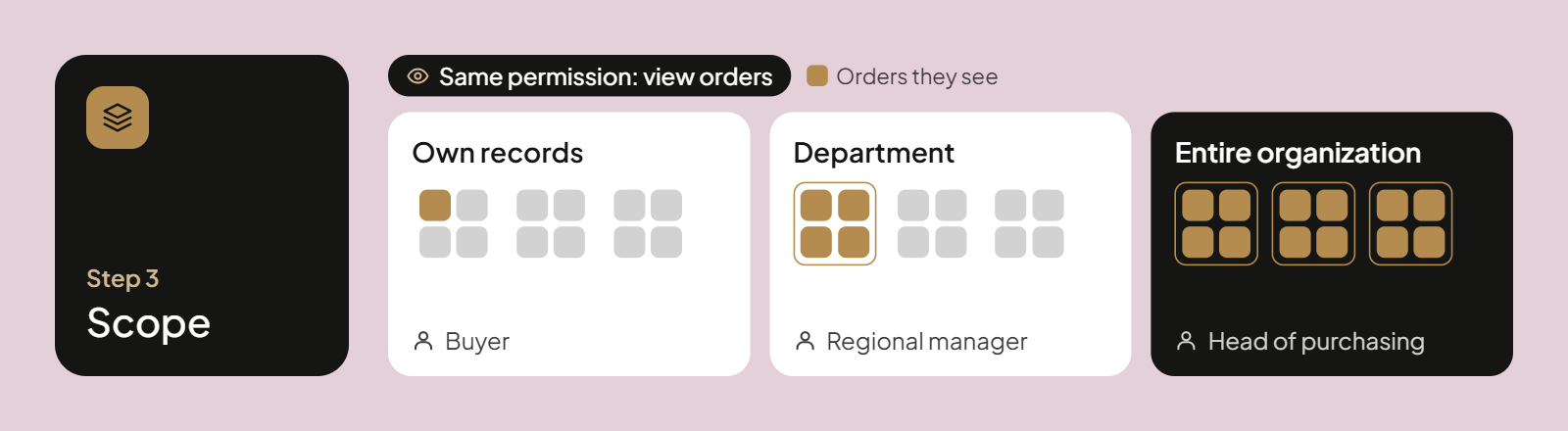
You’ve given a sales rep permission to view orders. But which orders? Every customer’s, or only those belonging to accounts they manage?
Add a scope column to your permissions matrix. Depending on the role and resource, access might cover:
- Own records: Information belonging to an individual user.
- Department or location: Records associated with a particular business unit.
- Assigned accounts: Customers managed by a specific sales or service employee.
- Entire organization: Records across the customer company and its subsidiaries, where appropriate.
Remember that different permissions within the same role may need different boundaries. A customer administrator, for example, might manage users across the company but only access purchasing records for their own division.
For large organizations, keeping access aligned with the customer hierarchy takes some planning. Document which departments, branches, or subsidiaries each role should have visibility into before configuring your RBAC system.
Step 4: Handle Exceptions Without Complicating Every Role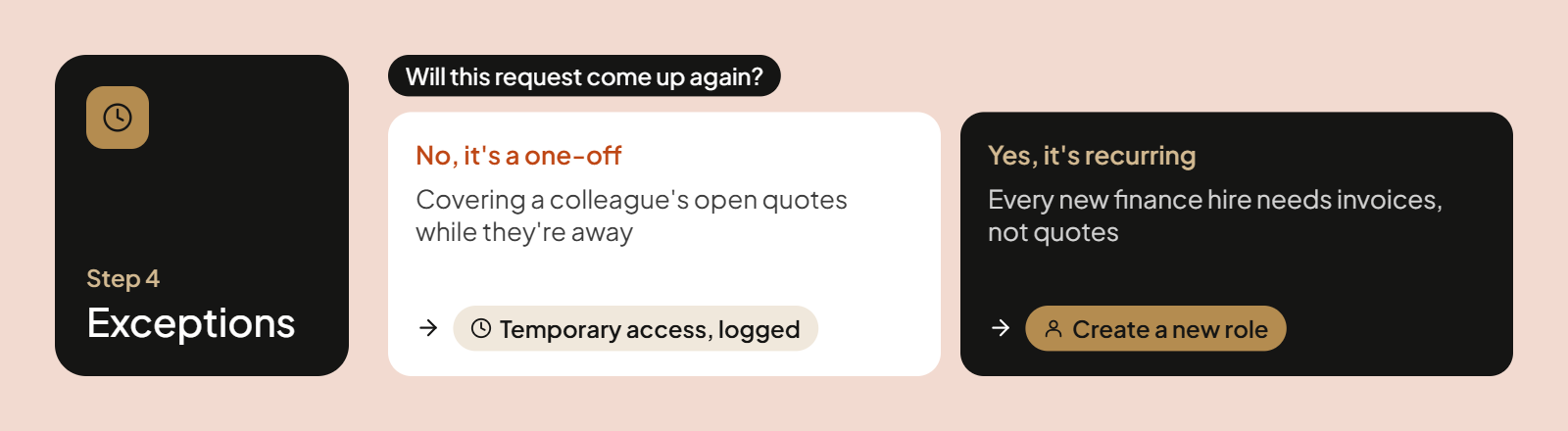
There’s always someone who needs something different. Maybe a buyer is covering for a colleague on vacation and needs temporary access to their open quotes. Does that mean you should change the permissions for every buyer?
Probably not.
Before creating another role or expanding an existing one, consider whether the access request is temporary, specific to one person, or likely to come up again.
If it’s a recurring business need, it may deserve its own role. If it’s a one-off request, see whether your access model supports individual permissions or temporary access to specific records.
Document these exceptions in your matrix, too. Otherwise, six months later, your IT team may have no idea why a particular user has different access rights or whether they still need them.
Example: A B2B Role-Based Access Management Matrix
Once you’ve listed your resources, actions, and access boundaries, you can bring them together in a permissions matrix.
Here’s a simplified example for a manufacturer or distributor managing access to its B2B eCommerce platform.
| User role | Orders | Quotes / RFQs | Invoices | User management |
|---|---|---|---|---|
| Buyer | Create, submit, view own orders | Create, view own quotes | No access | No access |
| Approver | View assigned orders, approve assigned requests | No access | No access | No access |
| Procurement manager | View all company orders | View, edit department quotes | View company invoices | No access |
| Customer administrator | No access | No access | No access | Add, edit, deactivate company users |
| Billing / accounts payable | View company orders | No access | View, download company invoices | No access |
| Sales representative (internal) | View assigned customers’ orders | Create, view quotes for assigned customers | No access | No access |
This is a requirements-planning example, not a standard role configuration. The sales representative is an internal, seller-side role, while the other roles belong to customer organizations.
Notice that a customer administrator can manage users without automatically receiving purchasing privileges. Similarly, someone in billing can access invoices without needing permission to submit orders.
Use the matrix as a starting point for conversations with your sales, customer service, and IT teams. The goal is to agree on what each role needs before configuring access in your platform.
Who Should Assign Users?
Once you’ve defined the roles, someone needs to assign them to users. And for manufacturers and distributors serving hundreds of business customers, that can add up to a lot of administrative work.
Consider whether your platform allows customer administrators to add employees, assign predefined roles, and remove system access when someone leaves. Otherwise, every change might require a request to your internal team.
You can still control which permissions are available to each role while giving customers responsibility for managing their own users.
Find out which B2B digital commerce platforms can enforce your permissions matrix.
How to Keep Role-Based Permissions Secure Over Time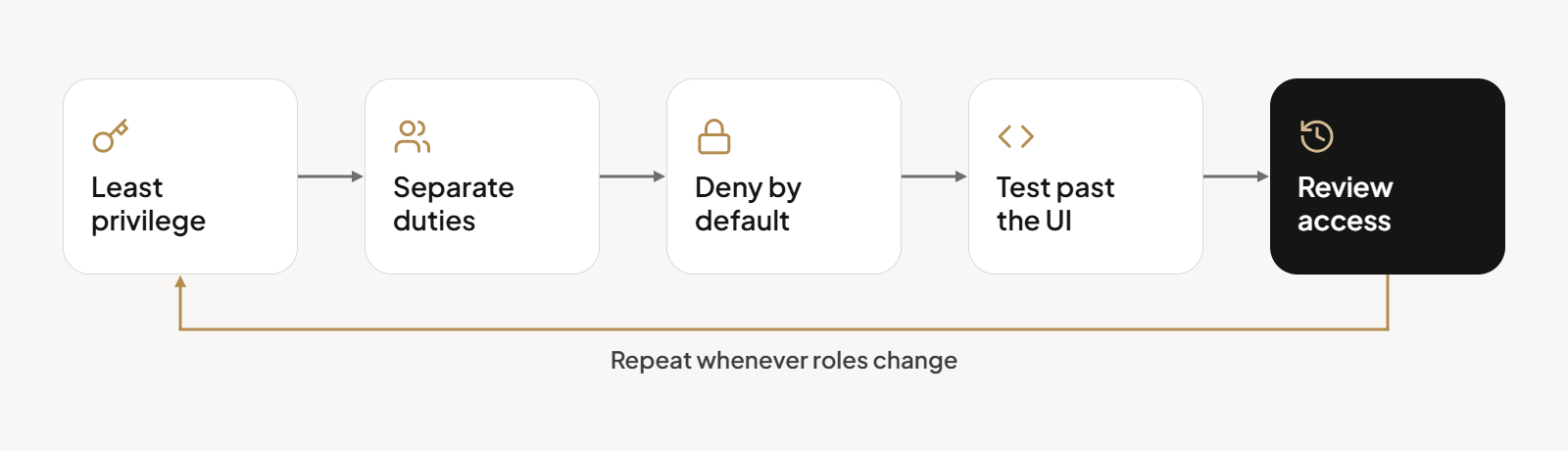
A permissions matrix documents what people should be allowed to do. But that doesn’t mean those rules are always followed.
Poorly configured permissions can expose sensitive data, from customer-specific pricing to financial records, and increase the risk of data breaches. And sometimes the biggest security risks come from seemingly harmless decisions, like giving someone broader access because it’s easier than configuring a new role.
Here are six practices that can strengthen your overall security posture.
1. Apply the Principle of Least Privilege
Say a customer service employee needs to check the status of an order. Giving them administrator access might solve the immediate problem, but it could also let them change account settings or view sensitive information they don’t need.
The principle of least privilege means granting users the minimum level of access required for their job duties.
Pay particular attention to administrative permissions and financial records. If someone only needs to view information, they shouldn’t automatically be able to edit it. Keeping permissions aligned with people’s responsibilities helps reduce human error while protecting sensitive data.
2. Keep Requesting and Approving Separate
Remember our earlier example of an employee who can both submit and approve orders? That combination deserves extra attention.
Even when someone holds multiple roles, your RBAC system should be able to enforce separation of duties. For example, a purchasing manager may be authorized to approve orders from their team, but shouldn’t be able to approve their own requests.
Check whether your platform can enforce these restrictions through its approval workflows rather than relying on employees to follow the rules.
3. Deny Access by Default
What happens when someone tries to access a record or perform an action that hasn’t been covered by your permissions?
The safer approach is to deny access by default. If the system can’t establish that a user is authorized, it shouldn’t grant the request.
This is particularly important when adding new features or expanding a customer portal. New functionality should only be available to authorized users, rather than everyone who happens to have an account.
4. Test Permissions Beyond What Users See
Hiding a button doesn’t necessarily prevent someone from performing the action behind it.
For example, a buyer might not see another customer’s invoices in the portal. But what happens if they try to open one through a direct URL or API request?
When testing permission authorization, check whether the server verifies that the user has access to that particular record. Depending on your requirements, pairing RBAC with context-aware access controls can help enforce restrictions based on the customer’s account, location, or relationship to the record.
And don’t overlook service accounts used by ERP integrations and other automated processes. They need defined access permissions, too, rather than unrestricted system access. This is especially worth considering as businesses introduce AI tools that can retrieve information and perform actions on behalf of users.
5. Review Access as Responsibilities Change
The permissions someone needed six months ago might be inappropriate today.
A buyer gets promoted. Someone moves from purchasing to the billing department. An employee leaves the company, but their account remains active.
Access management systems can help track role assignments, but someone still needs to check whether those permissions are appropriate. Make access reviews part of your regular process, especially when people change job functions or leave.
For companies subject to regulatory requirements, documenting access changes and reviews can also support regulatory compliance.
How Do Role-Based Permissions Apply to AI Agents?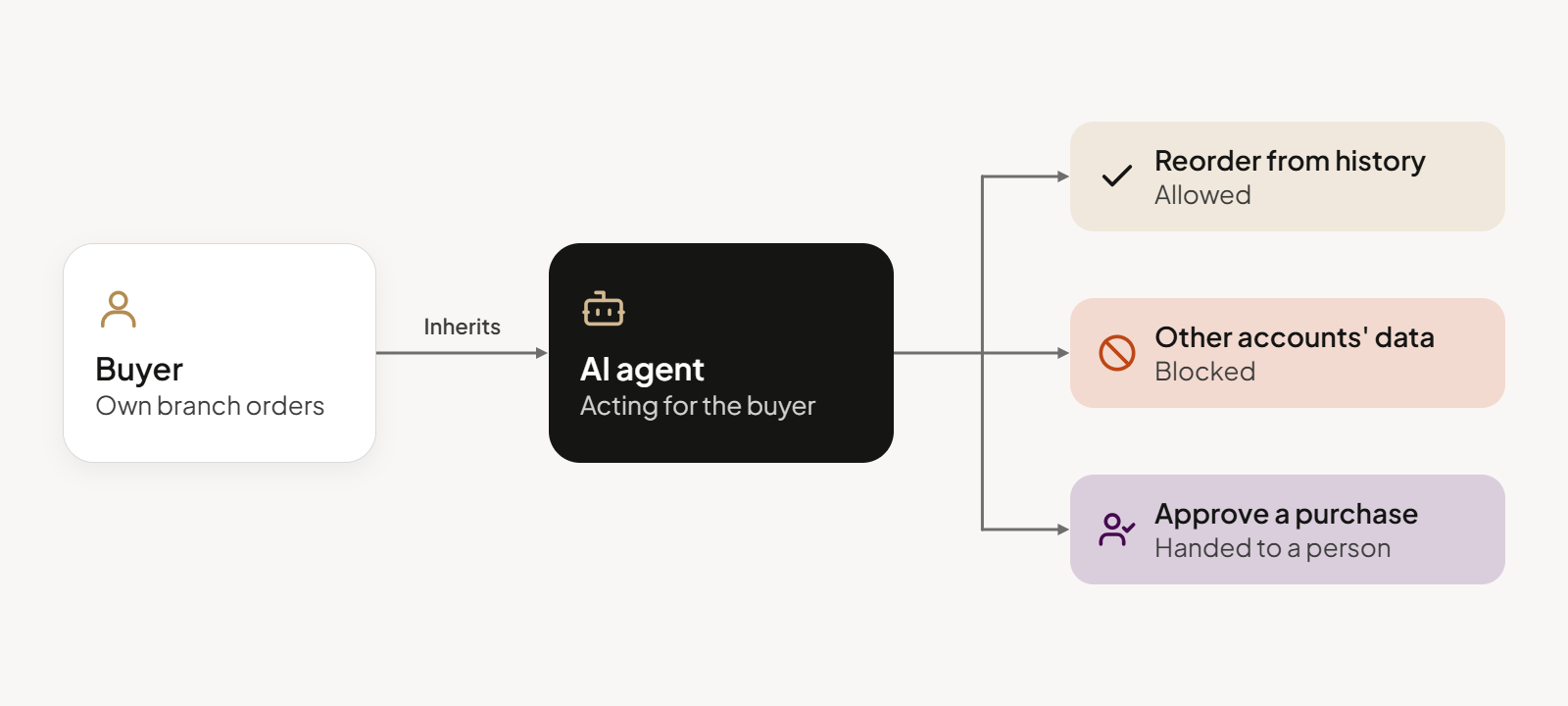
An AI agent might prepare repeat orders for a buyer or pull account history for a sales rep. Useful, until it retrieves another customer’s negotiated prices or takes an action its user couldn’t perform.
This is where permissions become part of building trust in AI. People need confidence that AI is using the right information, respecting access boundaries, and knowing when to hand control back to a person.
Before giving an agent access to your commerce systems, answer three questions:
- Whose permissions apply? An agent acting for a user should respect that person’s access rights. Agents using service accounts need their own defined permissions.
- Where does its authority end? Checking order status is different from changing a quote or approving a purchase. Define which actions require human approval.
- Can you trace what happened? Record what the agent accessed, which actions it took, and who authorized or overrode them.
These controls are part of a broader AI governance strategy. A helpful AI agent can lose someone’s trust pretty quickly if it shares information it shouldn’t have seen in the first place.
Whatever an AI agent is asked to do, the underlying commerce platform needs to enforce the appropriate access rules.
Walk into every AI demo knowing exactly what to ask. Download our AI in commerce checklist.
Give Every B2B User the Right Access With OroCommerce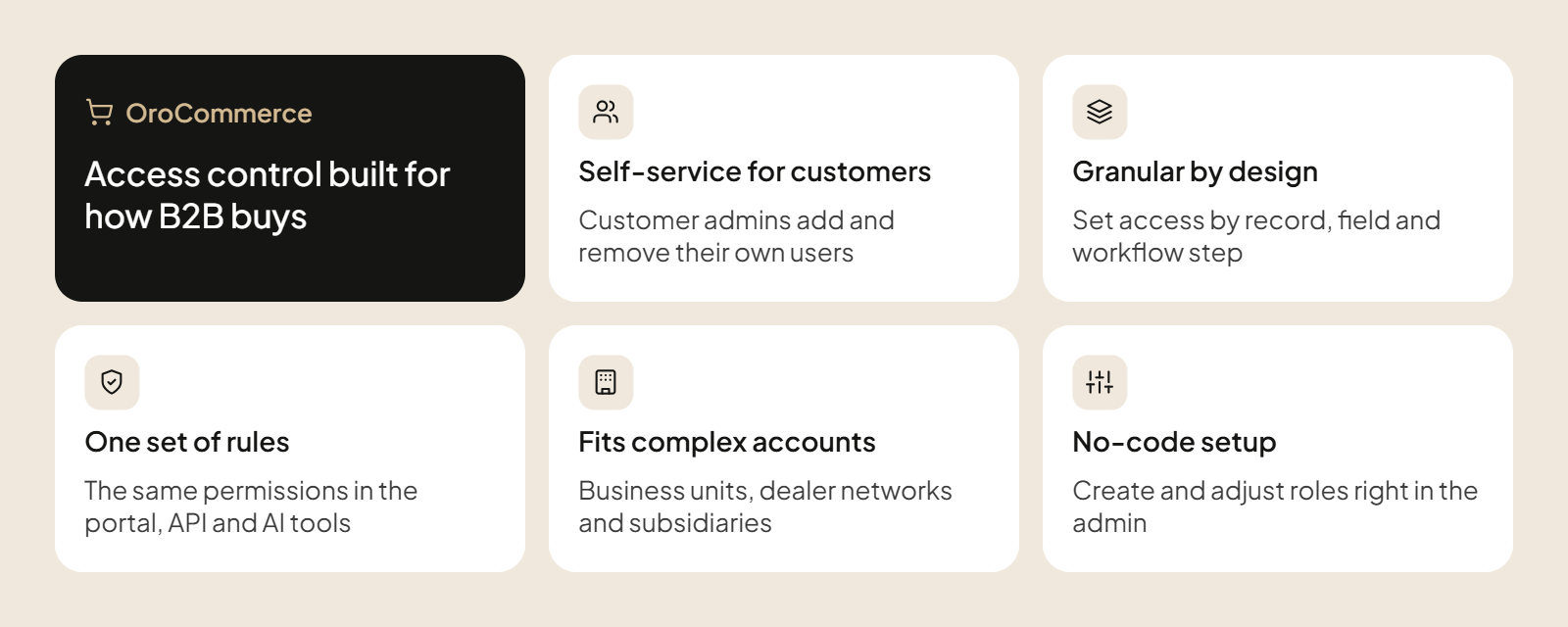
OroCommerce was built with those controls in mind. As a B2B eCommerce platform for manufacturers and distributors, it comes with built-in role-based permissions that can be configured down to specific records and organizational levels.
For example, you can give a buyer access to their own orders, a regional purchasing team visibility across its department, and corporate procurement access across the customer organization. OroCommerce supports different permission levels for each role, rather than giving everyone the same access.
And there’s more to it:
- Customer-managed access: Customers can manage their own users and create roles through the storefront, provided they have the appropriate permissions.
- Granular controls: Permissions can be configured for individual business records, fields, and workflow actions. This applies to internal teams as well as customer users, with access levels suited to each.
- Built-in flexibility: Administrators can create and adjust roles through the interface as business requirements change, while standard API operations also respect configured access permissions.
This approach is particularly useful for manufacturers and distributors managing multiple business units, dealer networks, or customer organizations with different purchasing structures.
Take a closer look at how OroCommerce handles roles, permissions, and customer hierarchies.
Conclusion: Get Role-Based Permissions Right From the Start
Getting role-based permissions right means giving people the access they need while keeping customer information and purchasing processes under control. OroCommerce gives manufacturers and distributors the built-in flexibility to manage those permissions as their customers and business requirements change.
FAQ: Role-based Permissions in B2B eCommerce
What Are the Four RBAC Models?
NIST describes four RBAC models: Core (Flat), Hierarchical, Constrained, and Symmetric. They cover basic role assignments, inherited permissions, restrictions on conflicting duties, and permission reviews. The ANSI/INCITS 359-2004 standard later formalized RBAC.
What Are the Biggest Limitations of RBAC?
Too many specialized roles can lead to role explosion, making permissions difficult to manage. RBAC can also struggle with temporary access and service accounts, particularly across cloud platforms and connected cloud infrastructure. Additional controls may be needed to maintain the least privilege principle.
How Does RBAC Enhance Security and Support Compliance?
When properly configured and enforced, RBAC ensures only authorized individuals can access protected resources. It also helps organizations, including financial institutions, document permissions for regulatory compliance. However, RBAC alone doesn’t guarantee GDPR or HIPAA compliance. Test your configuration in a limited environment before full rollout.